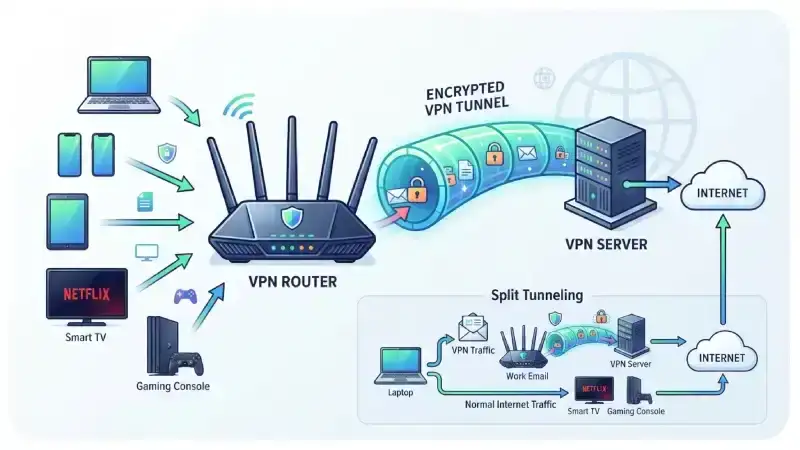
A VPN router combines two important networking functions: routing Internet traffic and handling a virtual private network (VPN) connection. Instead of installing VPN software separately on every device, you can configure a compatible router to send traffic through a VPN connection for devices connected to your home or office network.
That can be useful for households with many devices, small businesses, remote workers, and people who want centralized network management.
But a VPN router is not simply a normal router with a VPN label. Its capabilities depend on the router hardware, VPN protocol, firmware, and the VPN service you use.
What Is a VPN Router?
A VPN router is a router that supports VPN connections directly. It can create, receive, or manage encrypted VPN tunnels depending on its configuration.
A traditional router directs data between your local network and the Internet. A VPN-enabled router adds VPN functionality to that process. Cisco describes VPNs as encrypted connections over the Internet that help protect data as it travels between devices and networks.
For example, imagine you have:
- A smart TV
- Two smartphones
- A laptop
- A gaming console
- Several smart-home devices
With individual VPN apps, you may need to configure the VPN separately on supported devices. With a VPN router, you can potentially configure the VPN at the network level so multiple connected devices use the same VPN connection.
The exact behavior depends on the router’s VPN features and configuration.
How Does a VPN Router Work?
The easiest way to understand a VPN router is to follow the path of your Internet traffic.
Normally, your device connects to your router, and the router forwards traffic toward your Internet service provider (ISP) and the wider Internet. Routers use routing information to determine where packets should go.
With a VPN configuration, the router can establish an encrypted tunnel to a VPN server.
The basic process looks like this:
Device → VPN Router → Encrypted VPN Tunnel → VPN Server → Internet
When the VPN is active:
- Your device sends traffic to the router.
- The router processes the traffic according to its VPN rules.
- The router encrypts and tunnels the traffic to the VPN server.
- The VPN server connects to the destination on the Internet.
- Responses travel back through the VPN connection.
Cloudflare explains that a VPN creates an encrypted tunnel between the client and VPN server. The ISP can see that a VPN connection exists, but the traffic inside the tunnel is encrypted.
VPN Router vs. Regular Router
A regular router primarily manages network traffic and provides connectivity between your local network and other networks.
A VPN router can perform those routing functions while also supporting VPN connections.
| Feature | Regular Router | VPN Router |
|---|---|---|
| Connects devices to the Internet | Yes | Yes |
| Creates a local network | Yes | Yes |
| Routes network traffic | Yes | Yes |
| Supports VPN functions | Usually limited or absent | Yes |
| Can route selected devices through VPN | Usually no | Often yes |
| Centralized VPN configuration | No | Often yes |
Keep in mind that VPN router can mean different things depending on the manufacturer. Some routers support VPN client connections, some support VPN servers, and some support both.
VPN Client vs. VPN Server on a Router
This distinction often causes confusion.
VPN Client
A router configured as a VPN client connects to a VPN provider’s server.
For example:
Home devices → VPN router → VPN provider → Internet
This setup can route traffic from your home network through the VPN provider.
VPN Server
A router configured as a VPN server allows an authorized remote device to connect back to your home or office network.
For example:
Laptop while traveling → Internet → VPN server at home → Home network
This can let you access resources on your private network remotely.
Cisco documentation describes router-to-router VPNs as a way to create secure connections between separate networks over the Internet.
Why Use a VPN Router?
A VPN router can solve problems that individual VPN apps do not always handle conveniently.
1. Protect Multiple Devices
One major advantage is centralized configuration.
Suppose your home has five devices that you want to route through a VPN. Instead of configuring each compatible device separately, you may be able to configure the router once.
This becomes particularly useful for devices that don’t support VPN applications.
2. Cover Devices Without VPN Apps
Many smart TVs, game consoles, streaming devices, and smart-home products don’t provide the same VPN-app support as computers and smartphones.
A router-level VPN can potentially route their traffic through the VPN without requiring an app on the device.
3. Simplify Network Management
Instead of maintaining VPN settings on many devices, you can manage the connection from one central location.
This can be especially helpful in small offices where administrators need consistent network policies.
4. Support Remote Access
Some VPN routers can act as VPN servers. This can provide a secure way for authorized users to connect back to a private network while traveling or working remotely.
VPN technology has long been used to connect remote workers and separate business networks securely over public Internet infrastructure.
Real-World Example: A Family Home
Consider a family with:
- Two laptops
- Three smartphones
- A smart TV
- A PlayStation
- Smart-home devices
Installing and managing VPN software across every compatible device can become inconvenient.
A compatible VPN router could handle the VPN connection centrally.
However, you may not want every device to use the VPN. For example, you might want a work laptop to use the VPN while leaving a gaming console on the normal connection.
That’s where split tunneling or policy-based routing can become useful, if your router supports those features.
What Is Split Tunneling?
Split tunneling allows you to decide which traffic uses the VPN and which traffic uses the normal Internet connection.
For example:
- Work laptop → VPN
- Smart TV → Normal connection
- Gaming console → Normal connection
- Personal laptop → VPN
This can help avoid unnecessary VPN traffic and may reduce performance problems.
Not every VPN router supports advanced routing rules, so check the manufacturer’s specifications before buying.
Does a VPN Router Make Your Internet Faster?
Usually, you should not buy a VPN router expecting faster Internet.
A VPN can sometimes reduce performance because traffic takes an additional route through the VPN infrastructure. Encryption and router processing can also affect throughput.
The actual result depends on:
- Your Internet speed
- Router CPU performance
- VPN protocol
- VPN server location
- Distance to the VPN server
- Network congestion
- Encryption workload
- Router firmware
A powerful router can handle VPN encryption more efficiently than older hardware, but even then, the VPN connection can become a performance bottleneck.
For gaming, video calls, and 4K streaming, test the VPN connection rather than assuming it will perform the same as your normal connection.
Is a VPN Router More Secure?
A VPN can improve privacy and security by encrypting traffic between the VPN client and VPN server. However, a VPN is not a complete security solution.
For example, a VPN does not automatically protect you from:
- Malware
- Phishing websites
- Weak passwords
- Unsafe downloads
- Compromised accounts
- Malicious browser extensions
- Poor router configuration
Cloudflare notes that VPNs can protect traffic between the client and VPN server, but the VPN server itself becomes an important part of the trust model.
This means you should choose a reputable VPN provider and understand its privacy practices.
VPN Router vs. VPN App
Both approaches have advantages.
VPN App
A VPN app is usually easier to install and gives you device-level control.
You can turn the VPN on or off for individual devices and often select different servers easily.
VPN Router
A VPN router provides network-level control.
It can be useful when you want multiple devices to use one VPN configuration, especially devices that don’t support VPN applications.
Simple rule: Choose a VPN app when you mainly need protection on a few personal devices. Consider a VPN router when you want centralized VPN coverage across a home or small network.
How to Choose a VPN Router
If you’re considering buying one, don’t focus only on the phrase “VPN router.”
Check the actual specifications.
VPN Protocol Support
Look for protocols supported by your chosen VPN service and router.
Common technologies include WireGuard, OpenVPN, and IPsec. The available options vary by router and firmware.
VPN Client Support
If your goal is to route home devices through a commercial VPN provider, make sure the router supports VPN client functionality.
A router that only supports incoming VPN connections may not meet your needs.
Processing Power
VPN encryption can place additional demands on the router’s processor.
If you have a fast Internet connection, choose hardware capable of handling VPN traffic at an appropriate speed.
Split Tunneling
This feature can be valuable if you want only certain devices or destinations to use the VPN.
Firmware Updates
Security updates matter. Choose a manufacturer that regularly maintains the router’s firmware.
Ease of Setup
A powerful router can still be frustrating if its VPN configuration is complicated.
Look for clear documentation, supported VPN protocols, and a straightforward management interface.
How to Set Up a VPN Router
The exact process varies by router and VPN provider, but the general steps are similar.
Step 1: Check Compatibility
Confirm that your router supports the VPN protocol required by your VPN provider.
Step 2: Update the Firmware
Install the latest supported firmware before configuring the VPN.
Step 3: Sign Up for a VPN Service
Choose a VPN provider that supports router connections and provides configuration information for your router.
Step 4: Enter the VPN Configuration
Depending on the router, you may need to enter server information, authentication details, certificates, or configuration files.
Step 5: Choose Which Devices Use the VPN
If your router supports policy-based routing or split tunneling, decide which devices should use the VPN.
Step 6: Test the Connection
Check your public IP address and test websites, streaming services, video calls, and other important applications.
Also test your Internet speed with the VPN enabled and disabled so you can see the real performance difference.
Common VPN Router Problems
VPN routers can be convenient, but they aren’t perfect.
Slower Speeds
Older routers may struggle with VPN encryption, especially on fast Internet connections.
Connection Drops
A weak VPN server connection, incorrect configuration, or an unstable network can cause interruptions.
Streaming Issues
Some streaming services actively restrict VPN traffic. A VPN router cannot guarantee access to every service.
Gaming Latency
Routing traffic through a distant VPN server can increase latency. Gamers should test server locations carefully.
Configuration Complexity
Advanced VPN settings can be confusing for beginners. Incorrect routing or DNS settings can also cause unexpected behavior.
Do You Need a VPN Router?
You may benefit from one if you:
- Have many devices at home
- Want centralized VPN management
- Need VPN coverage for devices without VPN apps
- Run a small office
- Need remote access to a private network
- Want to control which devices use a VPN
You may not need one if you only use a VPN occasionally on a laptop or smartphone. In that case, a reliable VPN application may be simpler.
Final Thoughts
So, what is a VPN router? It is a router that supports VPN functionality and can manage encrypted VPN connections at the network level.
Its biggest practical advantage is convenience. Instead of configuring a VPN separately on every compatible device, you can potentially manage the connection from one central router.
However, performance and features vary significantly between models. Before choosing one, check VPN client support, supported protocols, processing performance, split-tunneling options, firmware support, and compatibility with your VPN provider.
A VPN router can be a useful part of a privacy-focused network, but it works best when combined with strong passwords, updated software, secure Wi-Fi settings, and sensible online security practices.